There are two ways you can upload EOBs into Anatomy.
SFTP
If you have an SFTP connection set up with Anatomy, you can directly upload EOBs into the SFTP folder. If you have questions about this, please contact the person who owns your Anatomy account, or you can contact us at support@anatomy.com.
Direct Upload in Anatomy
You can also directly upload EOBs into the Anatomy platform. To do this, follow the steps outlined below:
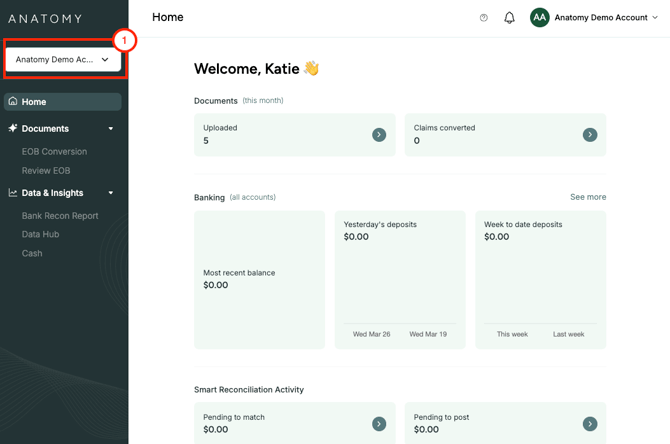
1. Make sure you have navigated to the correct practice using the menu in the top left hand corner, if you have multiple practices on the Anatomy platform.
2. Click on "EOB Conversion" on the left hand menu under "Documents". Once on this page, you will be able to either drag and drop documents into the box highlighted on the top right, or you can click and upload files directly from your computer.
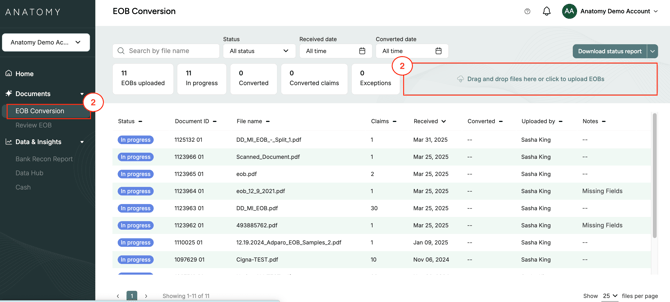
3. Once EOBs are uploaded, you will be able to see the progress, as well as any notes associated with the individual files. You can also filter for certain statuses, date periods, or converted date periods.
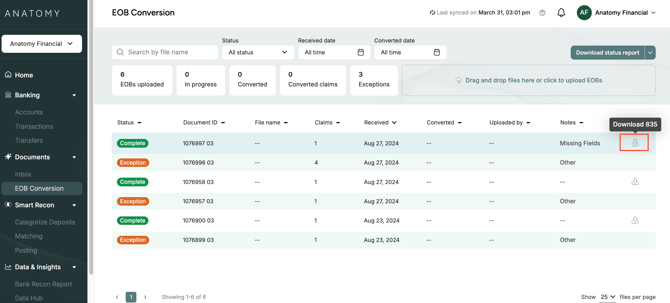
4. You can also manually download converted 835s directly from this page by clicking on the downward arrow icon. If you have any automation set up to return 835s, you may not need to manually download files, but this option is available for all users.