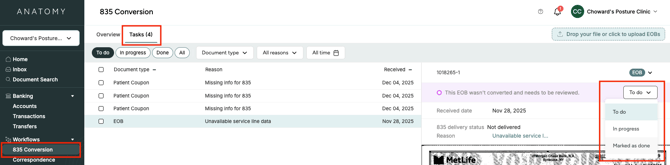
You can access the 835 Conversion Tasks workflow by clicking on "835 Conversion" under "Workflows" in your left sidebar.
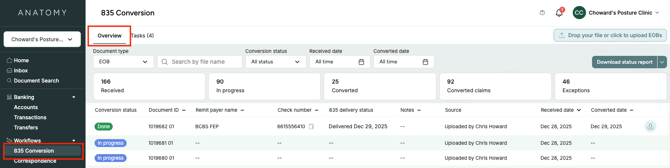
The Overview tab displays each EOB in Anatomy, whether it was mailed to your lockbox or uploaded directly into the Anatomy app. In this tab, you can see information about each EOB, including its conversion status, payer name, and check number. For customers who have chosen to have their patient coupons converted into 835 files, you can also view the status of those converted files on this page.
The Tasks tab displays the "to-do" status of any EOBs or patient coupons that could not be automatically converted to an 835 file. Here, you can view each exception and the reason that it wasn't able to be automatically converted, and then mark it as "in progress" or "done." You can also filter by task status, document type, exception reason type, and date.